




Collect the Spectacular. Introducing Super Stickers: Spectacular Series
The next chapter in the VeeFriends Super Stickers series has arrived. Released in August 2025, Super Stickers: Manga Series featured a…
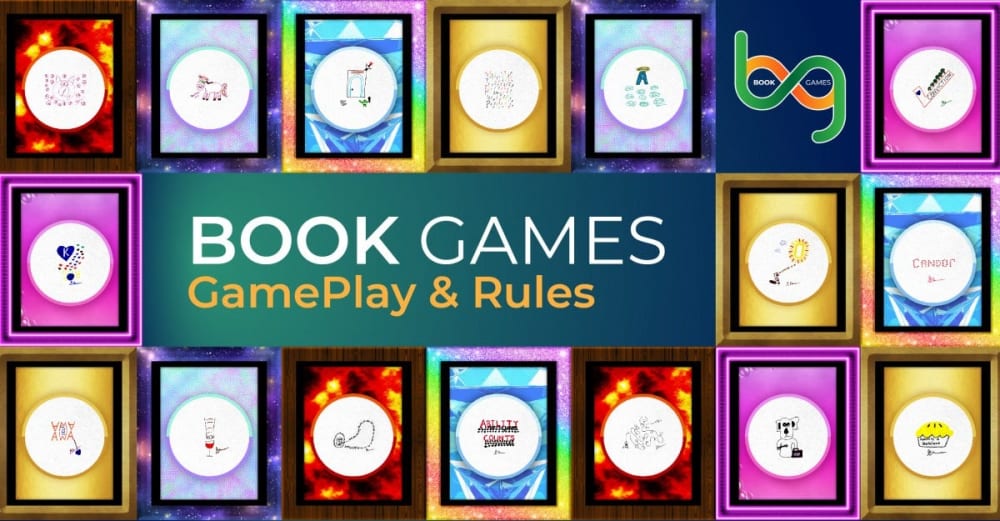
We are excited to announce the launch of BOOK GAMES on January 10th, 2022, tomorrow afternoon EST.
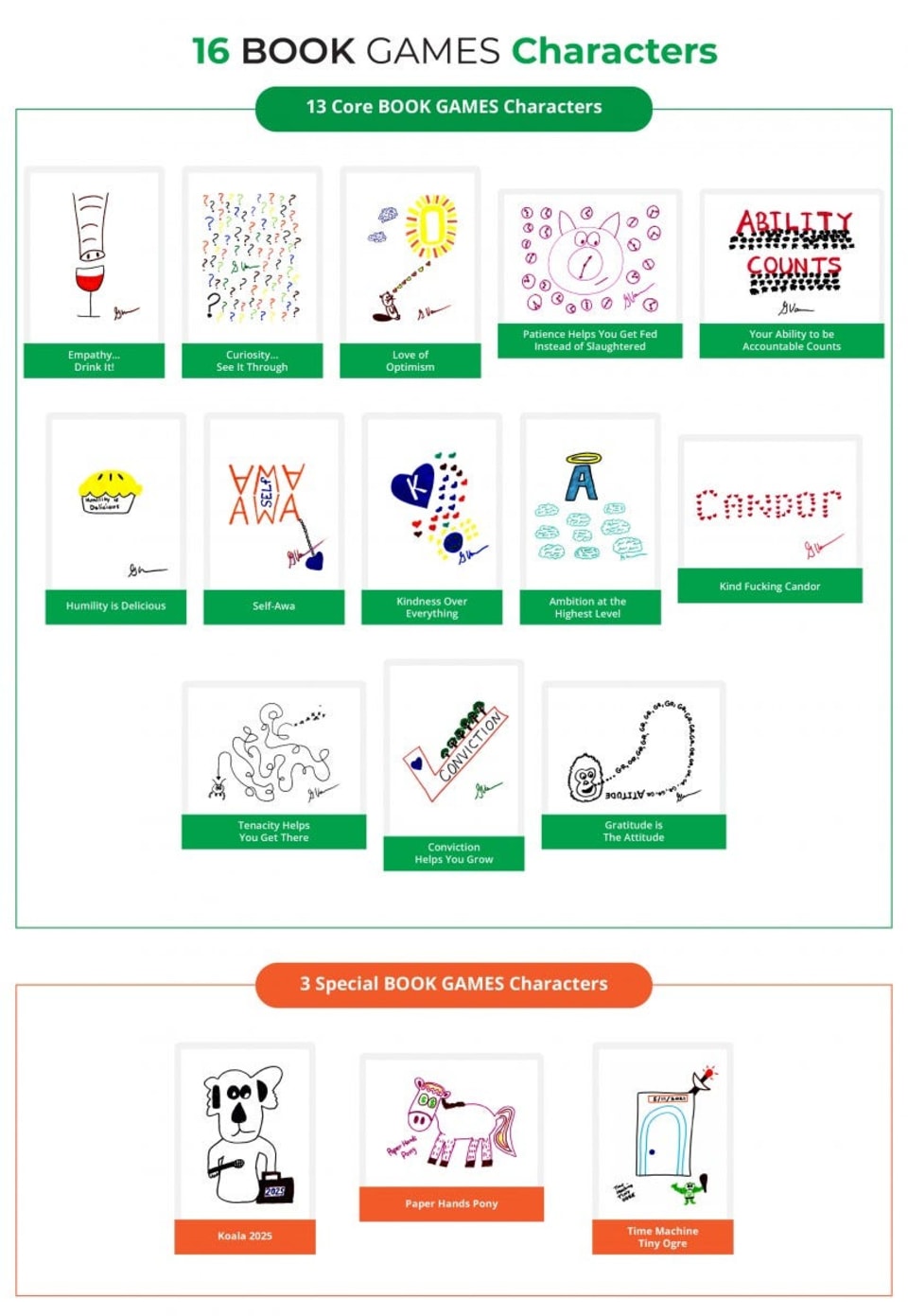
Welcome to BOOK GAMES, a layer 2 NFT project brought to you by GaryVee, featuring 125,000 burnable tokens in a game that's played forever. The token artwork drawn by Gary was inspired by the VeeFriends character category "Just Art", which showcases different artistic interpretations of the 13 emotional ingredients of Gary's newest book Twelve and a Half as well as 3 unique and Special artworks Koala 2025, Paper Hands Pony, and Time Machine Tiny Ogre.
BOOK GAMES are played FOREVER.
BOOK GAMES are burnable assets for other assets.
BOOK GAMES tokens are a FRIENDS Pass which gives a 12 and a half-day advantage to minting VeeFriends Series 2 this spring ahead of the public mint. You will not need to burn your token for eligibility!
There are 15 new VeeFriends characters being introduced in Series 2 (alpha alert!), and the ONLY way you will be able to get access to minting these characters is by burning BOOK GAMES tokens. **
Please know, it is not guaranteed BOOK GAMES tokens will allow you access to pre-mint series 2 or the new VeeFriends series 2 characters, BUT, BOOK GAMES tokens are the only way to have the chance to do so!
BOOK GAMES NFTs are made up of 16 unique artworks hand-drawn drawings by Gary, there are 5 spectacular rarities for each drawing, and each NFT is encased in one of 15 randomly generated frames, creating a possible combination of 1,200 different token types.
Here are the 16 hand-drawn artworks by GaryVee, including 13 core BOOK GAMES characters and 3 Special characters
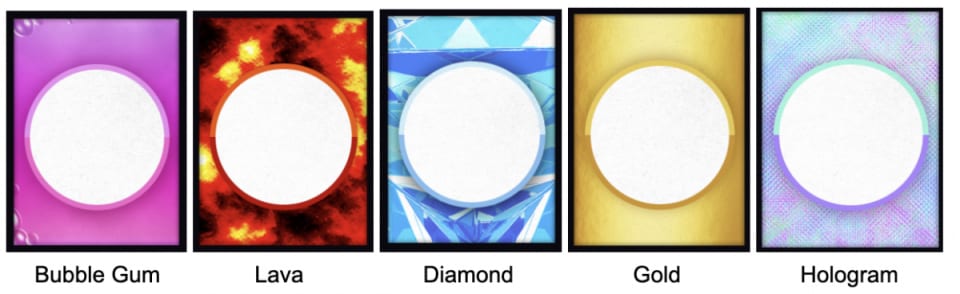
Each BOOK GAMES character is encased in one of the five VeeFriends Spectacular rarities-inspired background designs, including Bubble Gum, Lava, Diamond, Gold, and Hologram.
Each token artwork is also framed in 1 of 15 randomly generated frames.
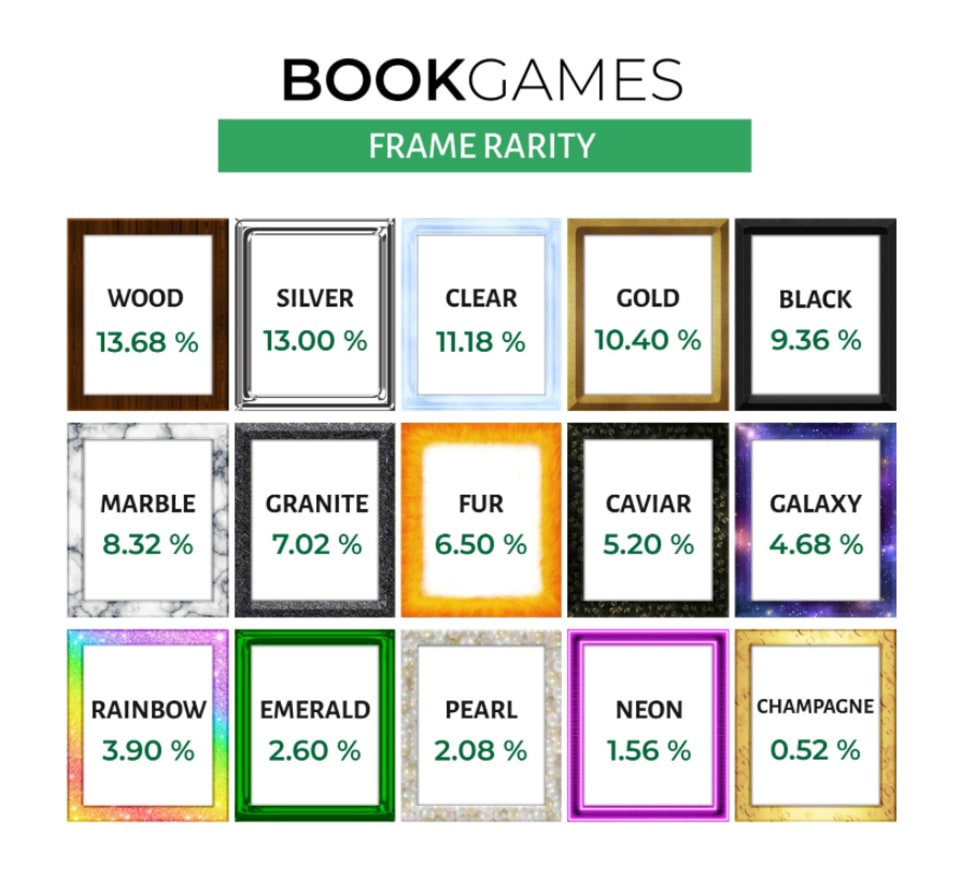
The combination of 16 original artworks, 5 Spectacular rarities, and 15 different frames creates a possible combination of 1,200 different BOOK GAME token rarity types.
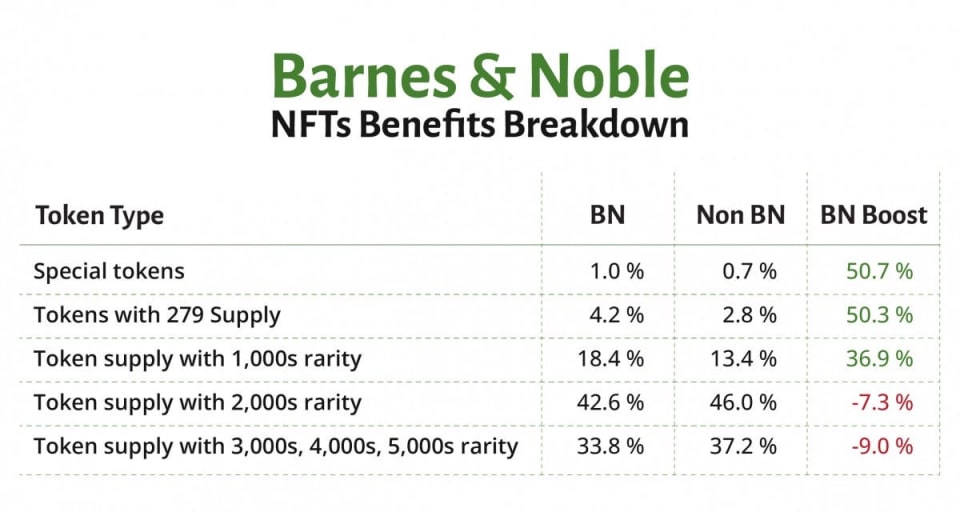
For those Barnes and Noble buyers, when Gary said you would get a benefit in the BOOK games because of the higher purchase price for books bought from Barnes and Noble you now have a higher chance of getting more rare Book Games tokens!
Below is a chart that breaks down just how much of an advantage Barnes and Noble (BN) buyers will get.
The percentages in the BN and Non BN columns represent how much of the specific token type corresponded to the BN and Non BN orders. For example, 1.0% of ALL tokens in the B&N token distribution are 'Special Tokens'.
The "BN boost" column is how much higher of a percentage chance a BN wallet has to mint that particular token type. For example, a BN wallet has a 50.7% HIGHER chance of minting a Special Token versus a Non BN wallet.
The first thing BOOK GAMES holders will need to do is claim their BOOK GAMES NFTs with an Immutable X Wallet with their confirmed BOOK GAMES wallet address. Here is a step-by-step guide on how to create an Immutable X wallet and claim your tokens which will be on VeeFriends.com/book-games.
Please note: Immutable X is only compatible with desktop and MetaMask at this time. Please do the following steps on Desktop through a MetaMask wallet.
If you are having trouble connecting, please try the following:
Hard refresh the website a few times. For windows: CTRL+Shift+R or for Mac: Command+Shift+R. Try logging in from a different browser, recommend Chrome.
Move your opened browser and see if the popup is behind your current browser.
Connect with MetaMask -> Connect
Sign in with your wallet -> Sign in -> Sign (to make things official!)
Set up Immutable X Key -> Agree to terms & conditions -> Set up -> Sign
Setup Complete! -> Finish
By selecting "Claim BOOK GAMES Tokens" the claim process will automatically begin. Please note, the more BOOK GAMES tokens that you are claiming, the longer the processing time may take.
Once the transfer is complete, the Immutable X widget will display the number of BOOK GAMES NFTs in your Immutable X wallet. Please note, correct display of tokens may take up to 1–2 minutes for IMX to reflect your airdropped tokens. If after 2 minutes the claimed tokens appear inaccurate, You may attempt to claim multiple times. If issues persist, please visit VeeFriends Discord and open a #support-ticket.
Once you've claimed your tokens, you're ready to play BOOK GAMES!
To view all your BOOK GAMES token inventory you can visit: https://tokentrove.com/account/collection/BookGames (this is what is on the left hand side of the the exchange marketplace).
Read and review the BOOK GAMES Game Play and Rules
Begin!
How To Set Up Your Immutable X Wallet Video Tutorial
The BOOK GAMES Exchange will allow eligible BOOK GAMES token holders to exchange their BOOK GAMES tokens for NFTs, Sports cards, VeeCon 2022 tickets, and a special "Just Art" prize bundle.
The Just Art Bundle includes a VeeFriends Series 1 G.O.O. (Gary Originally Owned) Core 'Just Art' VeeFriend and a PSA-authenticated original drawing of one of the Book Games token characters (each bundle is unique, so make sure to check out all thirteen different menu items to decide which one(s) you want the most on the exchange!).
The token requirement for items on BOOK GAMES Exchange will be based on a certain quantity of BOOK GAMES tokens such as "10 BOOK GAMES tokens". Other times rarity type will also be included as an exchange requirement, such as GOLD VeeCon 2022 ticket requires 13 unique BOOK GAMES tokens all with a GOLD spectacular type or any of the Just Art Bundles requiring 65 unique BOOK GAMES tokens all with the same Spectacular rarity type. Meaning, the first 13 players who collect ALL 13 core BOOK GAMES characters in the respective 5 spectacular backgrounds (a total of 65 tokens = 13 core characters * 5 rarities (Lava, Gold, Bubble Gum, Diamond, Hologram) will be eligible to exchange one of the thirteen JUST ART BUNDLEs on the exchange.
BOOK GAMES Exchange is launching with NFTs such as CryptoPunks, Bored Ape Yacht Club, World of Women, Wrapped Strikers, CurioCards, and many more. There are also physical sports trading cards, such as a 1992 Stadium Club Beam Team Shaquille O'Neal ROOKIE PSA 9 card, Devin Booker's 2015 Panini Prizm Rookie, or even the iconic 1980 Topps Basketball Rookie of Larry Bird, Julius Irving, and Magic Johnson PSA 8 rookie card. Lastly, Gary has gifted to the Exchange 1,000 of his VeeCon tickets that he will be receiving from the 1,000 G.ary O.riginally O.wned (or G.O.O tokens) VeeFriends he owns.
Below is a step-by-step video and tutorial on how you can purchase an item from the exchange!
Example Exchange for Bored Mummy Waking Up #5452
Click on the available item on the Exchange catalogue
Once you enter the item's exchange page you will need to begin Step 1. Check Eligibility to verify you have the correct BOOK GAMES token quantity and rarity necessary in order to be eligible for the Exchange item.
Once eligibility is approved, Step 2. Lock Tokens.
Once you complete this locking step, the selected item is locked by you for 10 minutes, which gives you the time to complete the exchange and prevents other users from attempting to exchange the same item.
Step.3 Select Tokens! This step shows you all available BOOK GAMES tokens you own. It is up to you to manually select which eligible tokens you would like to exchange. Note: Burning is irreversible, so please make sure you are burning the correct tokens.
Step.4 Confirm Burn! Enter the wallet address you would like to have the item sent to AND confirm the transaction through the Immutable X popup window.
Once the transfer is complete, the item on BOOK GAMES Exchange will show as exchanged and will display the wallet address it was exchanged to under Exchange Information.
NOTE: Your NFT will be transferred within 48 hours exchanging BOOK GAMES tokens. If you exchanged for a Sports Card you will be emailed within 72 hours to confirm shipping details for your Sport Card. For those who successfully exchanged for a VeeCon 2022 Ticket, the NFT ticket will be airdropped to the provided ETH address this Spring at the same time all VeeCon 2022 tickets are issued to VeeFriends Series 1 holders.
BOOK GAMES NFTs will be on the Immutable X marketplace known as TokenTrove which allows BOOK GAMES token holders to buy and sell BOOK GAMES NFTs. Before you can buy tokens on TokenTrove, you will need to first deposit ETH from mainnet Layer 1 to Immutable X.
In order to spend ETH on Immutable X to buy items, you must first deposit ETH into your Immutable X wallet to have "IMTBL ETH", also known as Immutable ETH. IMTBL ETH can also be withdrawn at any time back to ETH. Below are the steps to deposit ETH to your Immutable X wallet.
NOTE: Immutable X is not compatible with mobile so we recommend using a desktop for this experience.
After you click Connect Wallet on the top right corner, select MetaMask to connect your confirmed BOOK GAMES wallet address.
After you have signed to confirm wallet connection on TokenTrove you will now need to transfer your ETH to your Immutable X wallet by clicking Deposit next to IMTBL ETH. This is a 1:1 transfer conversion similar to ETH/wETH.
Now you can select how much ETH you want to deposit by using the scroll or manually typing inside the box. Once you have your selected amount you can now hit the deposit button.
After clicking Deposit, you will need a signature to confirm your MetaMask wallet to interact with your Immutable X wallet for this transaction. Then you will confirm the deposit amount of that transaction. Once confirmed and completed, you will then receive a message stating the "Deposit is on it's way". Deposits can take up to 15 minutes, so don't panic if it doesn't show up right away. You can also check the Etherscan of that transaction to monitor when it's complete.
NOTE: There is a gas fee due to this being a Layer 1 to Layer 2 transaction.
Select a collection — for the purposes of this example we'll select Gods Unchained. Once BOOK GAMES NFTs are live, there will be an available collection to select.
Click on the NFT token you would like to buy and you will then see the details of that token. Then click on the Buy button to initiate the transaction.
You will then need to confirm the purchase and sign and then you will see a Purchase Complete message.
After your purchase is complete, you can go back to TokenTrove and click My Account, and under Wallet, you can now see the NFT along with any others you have bought
NOTE: You cannot make offers in TokenTrove. You will only see items that are listed for sale.
Click on the NFT from your collection that you would like to sell and then click the List button.
You will then need to list the amount of that NFT you'd like to list (if you have more than 1) and then list the price in ETH — it will also show the USD conversion as well. Then click the List Now button.
After you will receive an Immutable X wallet pop-up to confirm the listing, followed by a MetaMask signature to confirm. Now your item is listed for sale. You can confirm by going back to your Wallet under My Account and you will notice a Listed label on your NFT indicating it is listed for sale.
Click on the NFT that you would like to transfer, and click on the Transfer button in the lower-left corner.
Enter the wallet address that you would like to transfer the token to.
NOTE: This transfer is for sending Layer 2 NFTs to another Layer 2 wallet. The process to transfer Layer 2 NFT to Layer 1 is outlined in the next section below.
3, After you enter the wallet address, click the Transfer button and confirm and sign your transaction and now your transfer is complete.
Although BOOK GAMES will only be played in Layer 2, for those who wish to transfer out to their Ethereum Mainnet / Layer 1 wallet we have created a simple guide for you here. Please note, once you transfer your Book tokens from Layer 2 to Layer 1 you cannot port/transfer them back to Layer 2 at this time, aka that token will not be able to participate in BOOK GAMES. It is also important to note that transferring from Layer 2 to Layer 1 can take up to 24 hours, so please keep that in mind if you decide to do so.
For more details, including images for each step and video on how to buy in TokenTrove, check out our comprehensive blog post here.
Let the games begin!
The next chapter in the VeeFriends Super Stickers series has arrived. Released in August 2025, Super Stickers: Manga Series featured a…

A new chapter awaits for BOOK GAMES tokens. Immutable X (IMX) recently sunset its original architecture and moved to a zkEVM model. As a…
We’re excited to introduce the VeeFriends Wallet powered by Privy: a secure, onchain wallet built directly into your VeeFriends account…

Be like Knowing Gnome - never miss exclusive VeeFriends updates, drops, and news! Get it all delivered straight to your phone by email and text!